
Shipping a UI that “looks right” but stalls in the real world is too expensive. That’s the problem with “we’ll test it later”.
Our guide breaks down UX design methods that front-load insight, reduce rework, and help you choose deliberately. If you ever typed “UX design when to use what method” into Google, this is your field-tested answer, structured for fast adoption on real products.
Key takeaways
- UX design methods reduce risk by answering the right question at the right moment.
- When teams deliberately choose methods based on decision type and project stage, they ship faster, avoid rework, and make evidence-based calls instead of opinion-driven bets.
- UX methods are decision tools. Each answers a different question.
- Frameworks set cadence; methods generate proof. Don’t confuse the two.
- Start wide (discovery), converge with structure, then validate with experiments.
- Forcing the wrong method at the wrong time burns time and budget.
- A lightweight decision flow helps teams pick a method in minutes.
- Accessibility audits are not optional as they expand reach and reduce risk.
- AI can accelerate analysis, but real users remain non-negotiable.
Frameworks vs. methods
UX design methods are the practical techniques teams use to understand users, shape solutions, and verify that the experience works (e.g., interviews, journey mapping, prototyping, and usability tests). Pick the method to match the question and stage of work.
Frameworks give you orientation and sequencing, while methods generate the proof. A few industry-standard frameworks you can use to pace research and design:
Use a framework to pick the lane you’re in. Then select one method that answers the current question with the least cost. Below are six proven UX design methods we apply most often (excluding personas and lab-based usability testing, which we link to at the end).
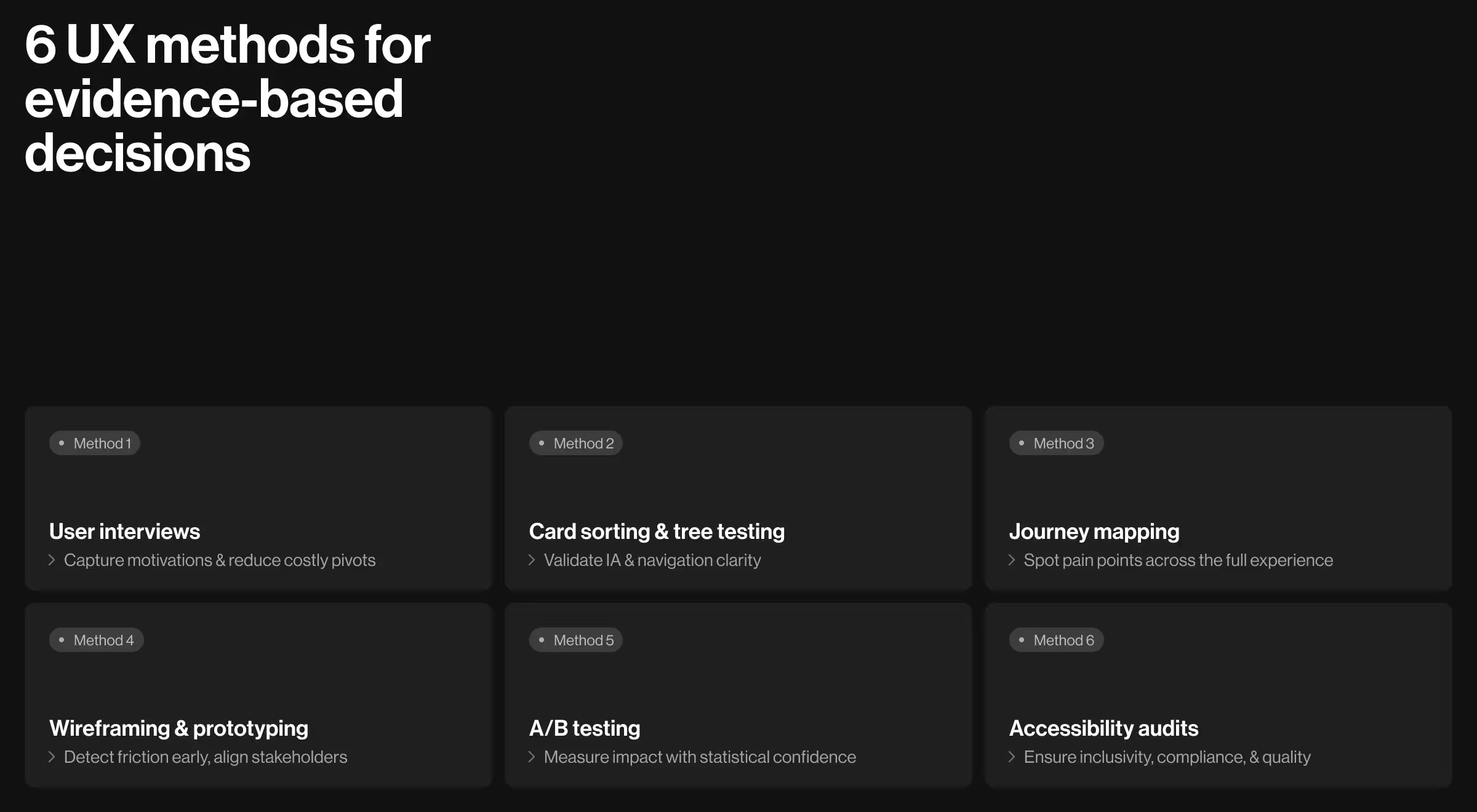
1. User interviews
- Use when: You need to map motivations, constraints, and mental models before defining scope.
- How it works: 30–45-minute semi-structured conversations with carefully screened participants. Analyze themes, contradictions, and language.
- Business outcome: Clear problem statements and success criteria that reduce costly pivots later.
- Implementation notes: Interviews complement behavioral data. Combine with analytics or support logs to avoid blind spots.
🔍 For broader method selection and timing, read our guide on UX research methods.
2. Card sorting & tree testing (information architecture validation)
- Use when: Navigation isn’t intuitive, teams disagree on grouping or labels.
- Card sorting (open/closed): Users group and label topics. Reveals mental models and category language.
- Tree testing: Users find items in a stripped-down text tree. Reveals findability and label clarity without UI noise.
- Business outcome: Faster task completion and fewer dead-ends from clearer information architecture.
Evidence base: Card sorting uncovers users’ grouping logic. Tree testing quantifies success, directness, and first-click paths.
3. Customer journey mapping
- Use when: Your product spans multiple touchpoints or handoffs, pain points feel scattered.
- How it works: Visualize steps, emotions, blockers, and ownership across stages (awareness → onboarding → value realization → renewal).
- Business outcome: Prioritized opportunities that reduce customer churn and raise time-to-value because fixes target the right moment in the journey.
- Implementation notes: Ground the map in data (interviews, analytics, support tags) and maintain it as a living artifact after release.
4. Wireframing & prototyping (low to high fidelity)
- Use when: You’re ready to move from ideas to testable flows.
- How it works: Start with low-fi wireframes for structure and copy. Evolve into clickable prototypes to test task completion and comprehension.
- Business outcome: Early detection of friction before engineers commit to scope, clearer stakeholder alignment around evidence.
- Evidence base: Prototyping sits in both “develop” and “deliver” stages, bridging ideation and validation within the Double Diamond and Design thinking flows.
5. A/B testing (controlled experiments)
- Use when: Competing solutions are plausible and stakes justify traffic split.
- How it works: Randomly assign users to variants. Measure pre-declared metrics (e.g., task success proxy, activation).
- Business outcome: Statistical confidence that a change causes the lift you claim (or doesn’t), preventing cargo-cult redesigns.
- Implementation notes: Pair with HEART to avoid vanity wins. A variant that lifts clicks but harms task success is a loss.
6. Accessibility audits
- Use when: You’re approaching MVP, shipping a redesign, or expanding enterprise deals.
- How it works: Manual checks + automated scans against WCAG. Include keyboard paths, color contrast, focus management, and error states.
- Business outcome: Larger addressable market, lower legal exposure, better UX for everyone.
- Implementation notes: Fixes often improve overall quality (e.g., focus, structure, semantics). Authoritative WCAG references are the standard to follow — apply the latest published criteria in your market.
Choosing design techniques fast with a lightweight decision flow
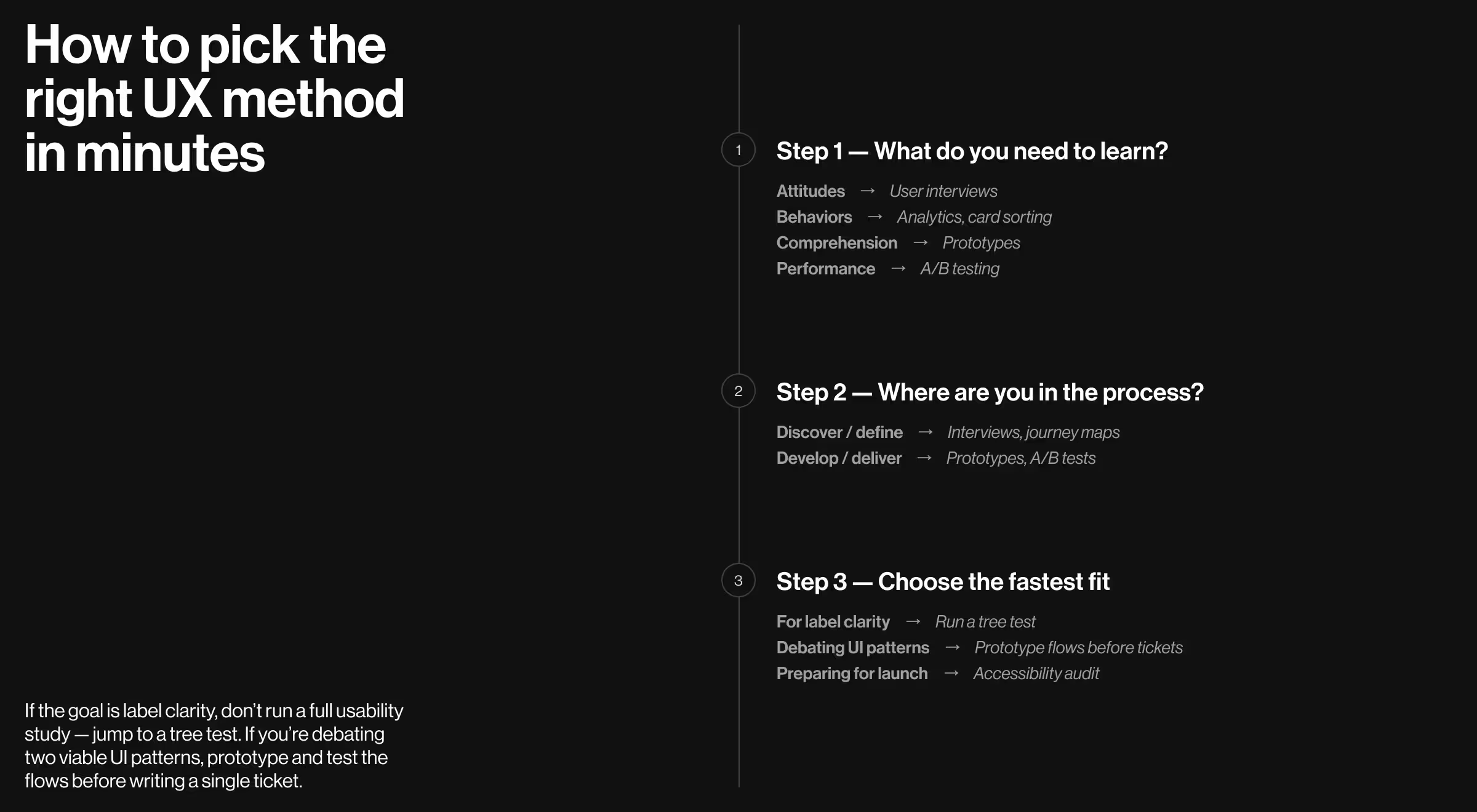
When the team asks “What do we do next?”, steer with this 3-step prompt:
- What do we need to learn? (attitudes, behaviors, comprehension, or performance)
- Where are we in the framework? (discover/define vs. develop/deliver)
- What’s the cheapest method that answers this now? (e.g., interviews → card sort → prototype → A/B)
If the goal is label clarity, don’t run a full usability study — jump to a tree test. If you’re debating two viable UI patterns, prototype and test the flows before writing a single ticket.
Related methods to explore next
Two core practices sit adjacent to the six methods above. We’re not unpacking them here, but they’re worth your time:
- User personas — when done with real data, personas align strategy, copy, and prioritization. Read more about this method on our blog: “UX persona examples from real projects with practical tips”.
- Usability testing — direct observation of users completing tasks. Essential before and after release. Read more about this method on our blog: “8-step UX design process to achieve product-market fit” (see Step 7: Usability testing & validation).
Putting it together on your product
Here’s a pragmatic sequence you can run on most initiatives in 4–6 weeks, adjusted for scope:
- Interviews clarify jobs, constraints, and language.
- Journey map aligns the organization on where the experience breaks.
- Card sort → tree test stabilizes IA and labels.
- Wireframes/prototypes let you validate comprehension and flows early.
- Accessibility audit ensures quality and compliance.
- A/B testing quantifies impact for high-traffic or high-risk bets, with HEART keeping metrics honest.
Throughout, keep your framework visible (use Double Diamond or Design thinking) so everyone knows why you’re diverging or converging.
Let’s apply this to your roadmap
If you want a partner to spin up the right research and validation sequence for your next release, don’t hesitate to talk to our team!
Explore our UX research services and usability testing services — we’ll help you choose the minimum set of methods that deliver maximum signal.



.webp)